

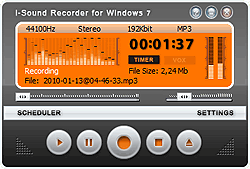
Napster has moved to free.napster.com, that's no different about the website, even more convenient for the music fans to listen to free streaming music online. It's really a good place for us, right? But your favorite music on Napster may move some day, due to many reasons such as the website change, more new songs published and the old ones out and etc. Wouldn't that be great if we could just download Napster music and record Napster music? There should be a program that helps us download Napster music. Audio Recorder is the best Napster downloader that can help you download Napster music with high speed and quality. You can't miss it, if you want to enjoy music freely.

How to download Napster music with Napster downloader?
- Download and install Audio Recorder.
- Visit free.napster.com. Listen to any music you like.
- Click the "Start Recording" button to start to download Napster music. Audio recorder can detect the audio signal and record Napster music to MP3 in the background automatically while you are playing Napster music.
Audio Recorder allows FREE 100 seconds recording in trial mode. Go and give it a try.
Remember to click the "Settings" to customize your own output music formats after launching this Napster downloader. Before downloading Napster music, you can set the output music format as MP3, WMA, WAV, OGG, APE, etc.
Then you could click the "Records list" to browse the downloaded Napster music.
Tips to download Napster music
Automatically split Napster music one by one. When you record Napster music, this Napster downloader will automatically split all music one by one. For instance, download Napster music for an hour, and you can get nearly 30 MP3 files. Of course, you can manually cut audio files into subsections as you like with this free Wave Editor. What's more, the embedded timer can free you away when it works on preset recording duration.
Edit ID3 information for any Napster music. After downloading Napster music, you can right click the key to add the Napster music to iTunes, Windows Media Player, or Winamp. It has an option of "Track Info" to edit music's ID3 information of "title", "artist", and "album". You can customize the output audio effect by adjusting the sample rate, bit rate, and sound channel