

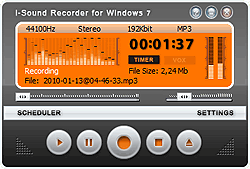
Record any audio played on your PC
Audio Recorder for Windows 10 and 7 will detect any audio signals passing through your computer, no matter where it comes from. So you can use audio Recorder to record those popular music or internet calls or interviews, either to save to you collection, or share it on the web with your friends. Using microphone you can easily create podcasts.

Record songs from online music sites
While you are surfing the net and enjoying the fresh music, have you ever wondered to record them to your local disk? That will be fantastic, right? Over 500 online music sites are all available. Even the music is DRM protected or with date limitation, you can just record those music freely.
Record thousands internet radio stations
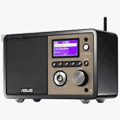
Lots of online radio stations out there. Record them is pretty easy. Audio Recorder helps you record more than 2000 internet radio stations. So you will not miss the first-run of the music or your favorite radio shows. In addition, you can save the recorded audios into MP3, WMA, WAV, OGG, APE, etc.

Record Skype calls
In addition to record online music or internet radios, Audio recorder can also record your Skype calls or sound coming through a microphone. Recording capabilities not limited by only Skype calls, you can record your conversations with any VoIP solution.
Start recording any time
Plus, you may schedule up to 100 recording task by using built-in scheduler. You can specify date and time for your recordings and even run external software at predefined time. For exemple, you can open website with online music or run your media player. The powerful automation functions enable you to split recordings on the fly.